
Changelog

Follow new updates and improvements to Sudowrite.

New AI Model: GPT-6.1 Sol

Barely a week after launching GPT-6 Sol, OpenAI is back with an upgrade: GPT-6.1 Sol is now available, and we've added it to Sudowrite.

OpenAI built this one to be even better at detail-heavy work, and says it makes about a third fewer factual errors than GPT-6 Sol on tricky prompts. For fiction writers, that shows up as better attention to your Story Bible details in longer Drafts. Early reviews of its prose are mixed, with some testers finding GPT-6 Sol's writing a bit more natural. (Try both on the same scene, and see which you prefer!)

GPT-6.1 Sol is available now in Write, Draft, and Plugins. Let us know what you think.

New!

Even More New Models: Sonnet 5.5, Gemini 3.7 & 3.8 and More

Claude Sonnet 5.5 launched today, and we’ve already made it available in Sudowrite. It's Anthropic's new mid-tier model, and it carries over some of the creative writing improvements we saw in Opus 5.5 (which we added last week). In our testing, it's about 30% faster and 30% cheaper than Opus 5.5.

We've also added several of the most-requested models from our community:

  • Gemini 3.7 Flash and 3.8 Flash are Google's latest fast models. These brainy boys can handle a huge amount of text at once, which makes them great in Draft and especially strong in plugins that work across your full manuscript.

  • GLM 5.3 is Z.ai's new flagship. It writes consistently solid prose and scores near the top of creative writing benchmarks. It's also one of the least repetitive models in testing, so try it for those long Draft sessions. GLM 5.3 Flash (formerly Ox Alpha) is the lighter, faster version.

  • Qwen 3.8 Max is Alibaba's top model. Try it when you want a completely different-sounding voice on the page.

  • Grok 4.7 is xAI's latest. Reach for it when you want strong prose that can handle no-holds-barred spice or violence.

Every model has its own strengths and weaknesses. Our goal is to make as many as possible available in Sudowrite, so you can find the right model for whatever it is you're working on. (Different pens for different pages!)

You'll find all these new models in the Prose Mode selector in Write and Draft, and in Plugins too. Let us know what you think, and which ones earn a spot in your regular rotation.

New!

Introducing Character Portraits

You’ve given your Characters names, aspirations, rich backstories, and probably even some undeserved trauma. Now you can give them faces too.

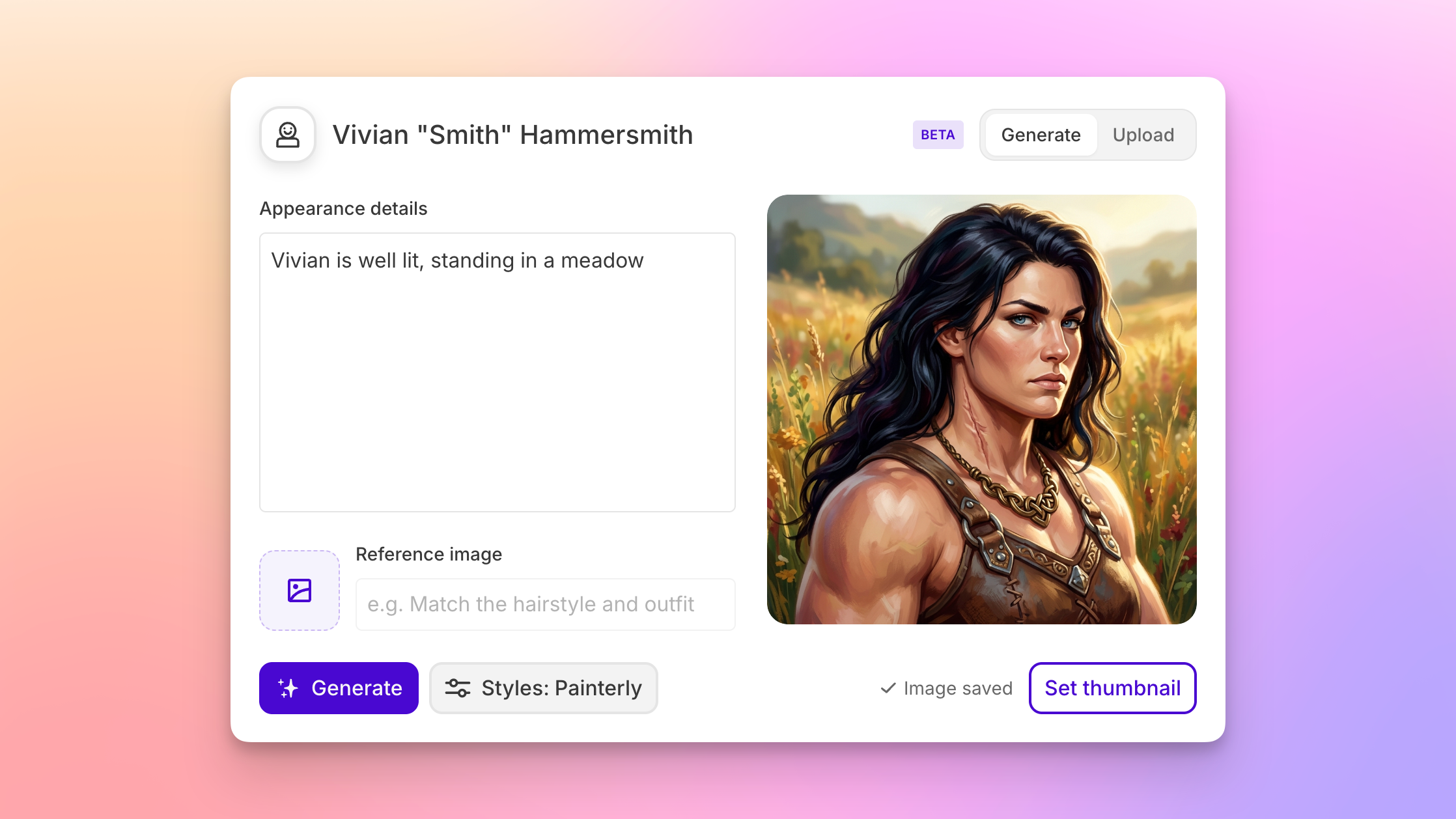
Character Portraits are now available in Story Bible. Effortlessly generate impressive portraits directly from your character cards or upload images you already have, to maintain a persistent visual reference for each character.

From description to portrait

Portrait generation uses your character’s existing Physical Description, so there’s no need to write a separate image prompt. Open a character card, click the empty Portraits box, choose a style, and click Generate.

We’ve included four default styles: Painterly, Cinematic Realism, Bright Editorial, and Storybook. Pick one, or select all four to generate different variations at once. Your brooding antagonist might look surprisingly charming in Storybook.

A little art direction

Want a particular outfit, expression, or setting? Add instructions in Appearance details to guide the portrait. You can even upload a reference image and explain what you’d like incorporated from that—say, a specific jacket your character should be wearing.

For more control over the art style, deselect the presets altogether and describe your own instead. A black-and-white pencil drawing? A vibrant graphic novel look? Give it a try.

Your cast, at a glance

Every generated portrait is saved to that character’s gallery automatically, so you can keep different looks and compare them later. Already have the perfect image? Use Upload to add it directly to the gallery.

Pick your favorite and click Set thumbnail. That portrait will appear beside the character’s name even when their card is collapsed, making it easier to find a familiar face in a crowded Story Bible. You can change the thumbnail or delete unwanted portraits whenever you like.

So what are you waiting for? Head to your Story Bible’s Character section and start firing off the glamour shots. We can’t wait to see who you make.
New!

Earlier updates